How to Use the LunarCrush MCP Server to Build Real-Time AltRank Monitoring Into Any AI Workflow
The LunarCrush MCP (Model Context Protocol) server lets any compatible AI assistant pull live social intelligence data directly into a conversation or automated workflow. No API keys to configure, no code to write. If you use Claude, Cursor, or any MCP-compatible client, you can query LunarCrush data in real time and build monitoring logic around it. Here is how to do it using today's live AltRank data as a working example.
What AltRank Is and Why It Matters for Automated Monitoring
AltRank is a composite metric that combines an asset's social activity with its market performance into a single ranking. Unlike sorting by price change or volume alone, AltRank captures the relationship between crowd behavior and market movement. An asset climbing the AltRank rankings is gaining both social traction and market momentum at the same time.
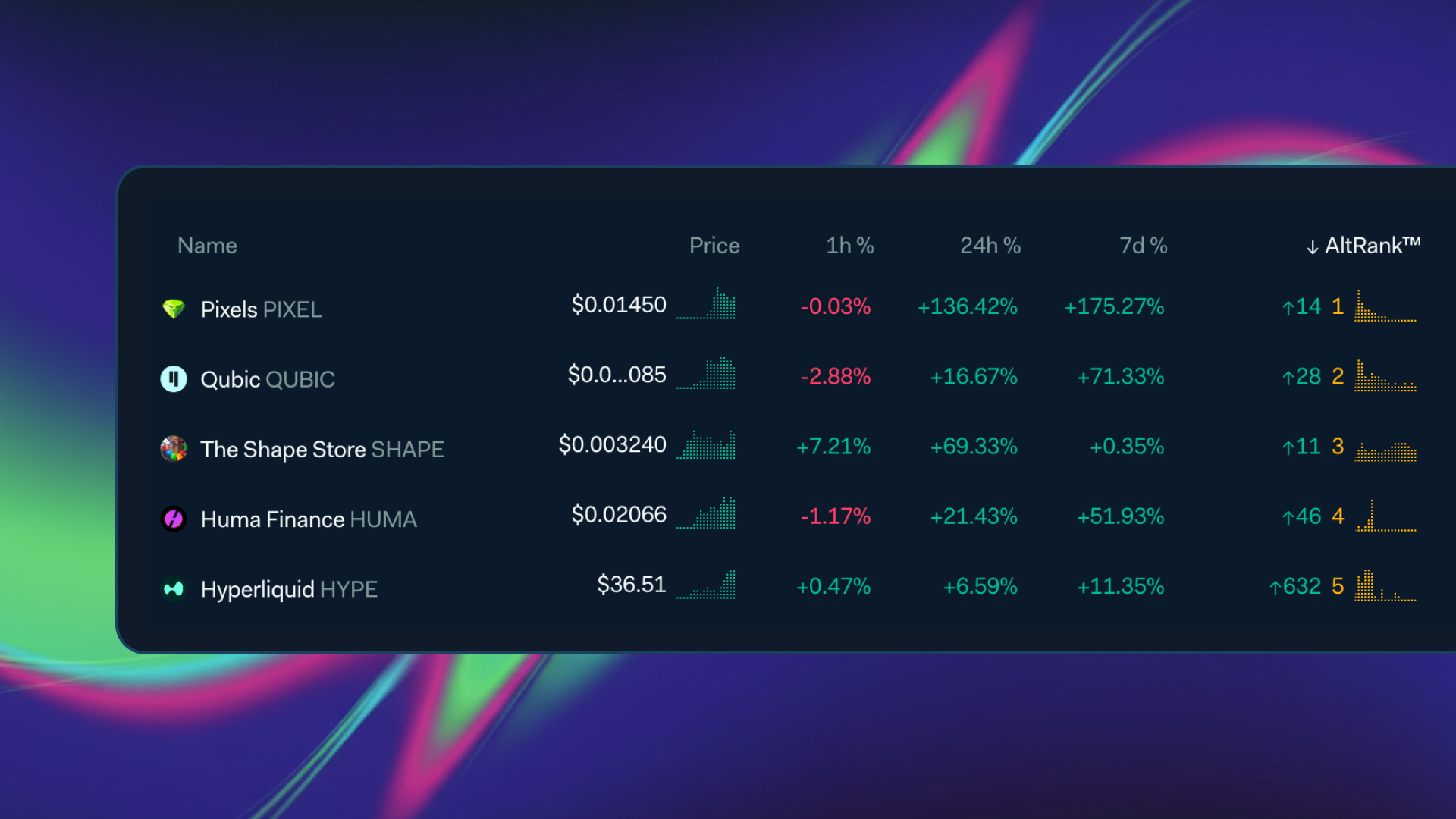
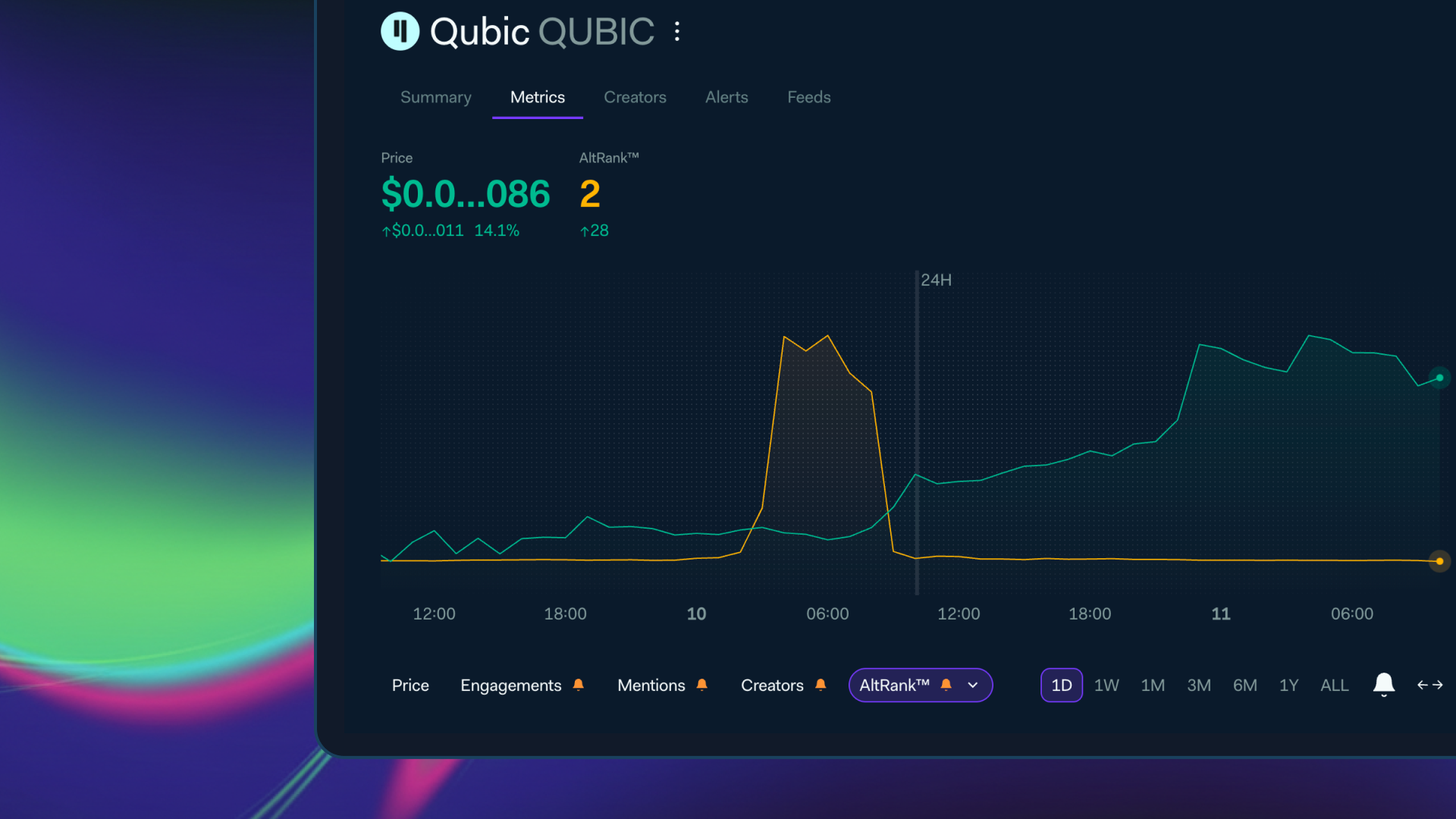
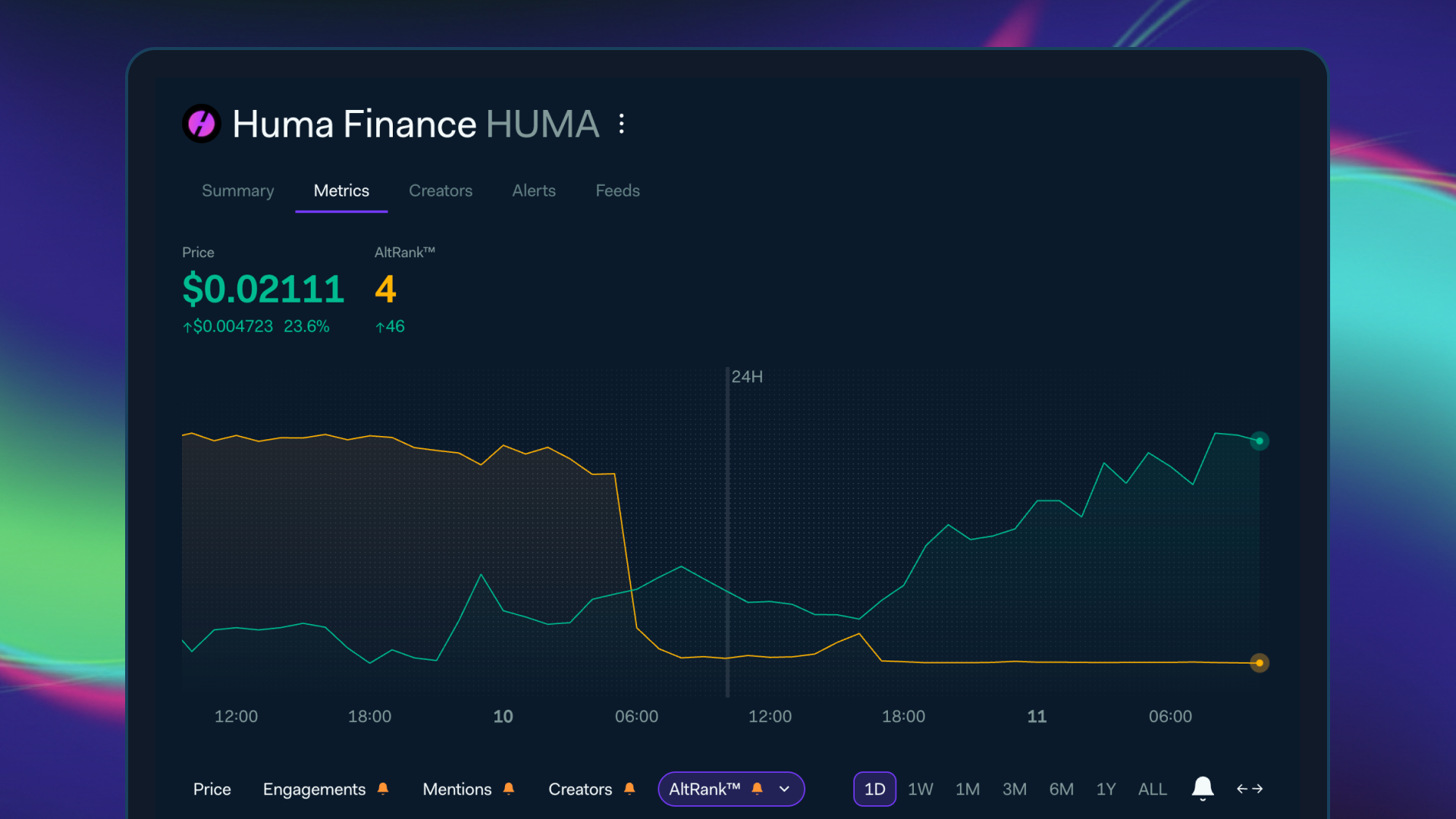
Today's leaderboard shows exactly why automated monitoring beats manual scanning. Pixels (PIXEL) sits at AltRank #1 with trading volume up 7,419% week-over-week and engagements up 444% from its daily average. Qubic (QUBIC) holds #2 after climbing over 600 positions from its daily average rank of 651. Huma Finance (HUMA) entered the top 5 after spending most of the past year ranked around 665. These moves happened inside 24 hours. An automated workflow catches them when they matter.
How to Pull This Data Using the MCP Server
The LunarCrush MCP server exposes several tools that return structured social intelligence data. For AltRank monitoring, two calls do most of the work.
The first is the Cryptocurrencies tool sorted by AltRank. In any MCP-compatible AI client, ask for the top cryptocurrencies by AltRank and you receive a ranked list with each asset's current rank, daily average, weekly and monthly changes, and historical highs and lows. A prompt as simple as this works:
The second is the Topic tool for individual asset deep dives. This returns sentiment scores, engagement volumes, social dominance percentages, price data, creator activity, and trending posts in a single call. Combine the broad scan with targeted deep dives on whatever flagged your attention.
A concrete prompt for that second step:
The response will show you, for example, that PIXEL's trading volume is currently $413M against a daily average of $17M, that sentiment is at 87%, and that the move was triggered by a founder teasing a new product announcement. That is not just a ranking. That is context.
Building a Monitoring Workflow
The simplest and most effective pattern is a daily scan. Pull the top 20 AltRank assets each morning. Have the AI compare today's list against the previous day's and flag three conditions:
Any asset appearing in the top 20 that was ranked below 400 yesterday
Any asset with a week-over-week rank improvement greater than 200 positions
Any asset where engagements are more than 300% above its daily average
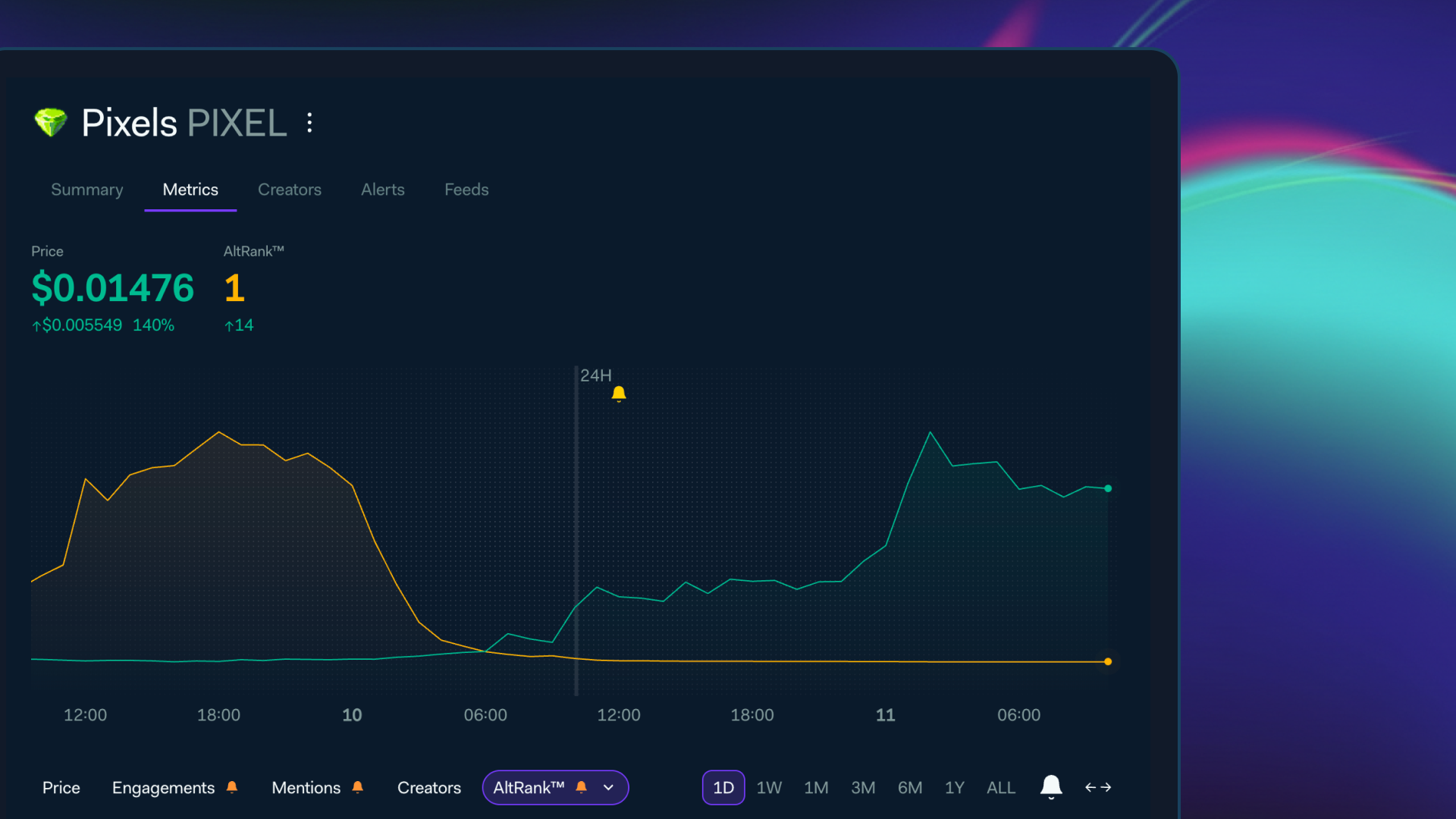
Today, PIXEL would have tripped all three. Its daily average rank is 1,005. Its weekly rank is 1. Its engagements are 444% above average. That is the kind of signal you want surfaced automatically, not discovered after a 140% price move has already happened.
For each flagged asset, follow up with the Topic tool and check four things:
Is sentiment above 75%?
Are engagements more than 200% above the daily average?
Is the price still below the 52-week midpoint?
Are there posts from creators with 100,000+ followers in the last 24 hours?
When all four conditions line up, you have an asset where social conviction is building ahead of a broader market reaction. The MCP server gives you all of this without a single API integration or line of code.
A concrete prompt that runs this full check:
Sector-Level Scanning
AltRank monitoring does not have to be market-wide. The Cryptocurrencies tool accepts a sector filter, which makes it possible to run targeted scans against specific narratives.
To monitor the GameFi sector, which is clearly active today with PIXEL, PORTAL, and XAI all moving together:
To watch the AI sector specifically:
Running both prompts side by side shows you which sectors are waking up before the broader market recognizes the narrative. Today, Fetch (FET) sits at AltRank #19 with engagements up 2,484% weekly and sentiment at a 52-week high of 99%, while the price is still down 13.77% over the past month. That divergence is the signal.
Narrative Detection From Top Posts
One of the most underused capabilities of the Topic tool is its top posts data. When an asset makes an unusual move, the post feed tells you why faster than any news aggregator.
PIXEL's move today traces directly to a single tweet from the founder of Pixels on March 10th, teasing "best in-industry tech" with no details beyond an announcement coming soon. That post generated 34,300 engagements.
The top posts tool surfaces it immediately. A monitoring prompt that uses this:
This turns your monitoring workflow into an explanation engine, not just an alert system. You are not just seeing that something moved. You are seeing why.
Automating Daily Briefings
Because all of this runs inside an AI workflow, the final step is assembling a daily briefing without writing code. A complete daily prompt that chains all of the above:
1 Pull the top 20 cryptocurrencies by AltRank
Run that prompt every morning through Claude with the LunarCrush MCP connected and you have a social intelligence briefing grounded in live data, delivered in plain language, with no dashboards to check and nothing to maintain.
Why This Approach Beats Manual Dashboard Checking
LunarCrush Discover is powerful for interactive exploration, but AltRank moves change daily. Manual checking means you might miss the day PIXEL jumped from a daily average rank of 1,005 to #1, or the day FET's social engagement exploded 2,484% while its price was still down. An automated MCP workflow catches every move, every day, and surfaces only the ones that match your criteria. It turns social intelligence from something you check into something that works for you.
Learn more about how you can pull this data directly into your AI workflows using the LunarCrush MCP integration at https://lunarcrush.com/products/lunarcrush-mcpserver. Once you've created a LunarCrush account, head to https://lunarcrush.com/integrations to get your API key and get started.